Product Details

Product:
KAPE WinPE Builder
Version:
3.0
Build:
135
Release date:
August 12, 2010
Changelog:
view
License: freewareUpdates:free
File size:
4.00 kB
MD5/SHA Hash:
view
Screenshots:
7 sample(s)
Availability:
 

KAPE WinPE Builder

Overview

With the release of WinPE 2.x, Microsoft introduced a new method of distributing WinPE, namely using pre-built Wim files included with the Windows Automated Installation Kit (WAIK). In order to create a new WinPE environment with this method the user must typically utilize a set of command line utilities and scripts from the WAIK, which can often be an arduous or confusing process to manage. KAPE was created to simplify this process, starting with the origination of the WinPE project through the creation of the final WinPE ISO.

Requirements

KAPE supports operating under all Windows operating systems starting with Windows XP.

All versions of the Windows AIK are supported, including Windows Vista/2008 and Windows 7 versions.

Operation

KAPE provides for the creation of a new WinPE project, enables automatic mounting/unmounting of .wim files, and includes functionality such as injecting Windows drivers and modifying the installed WinPE packages. Please see the reference tab for details.

Introduction

KAPE has been designed to simplify and automate the manual process of building WinPE environments. The normal process of managing a WinPE environment generally requires the use of scripts and utilities such as copype.cmd, peimg.exe, dism.exe, imageX, among others. KAPE helps to simplify this process by automating these steps within a standard GUI to create the WinPE project, mount the .wim file, add packages and drivers, and even create the final ISO file.

Project Based

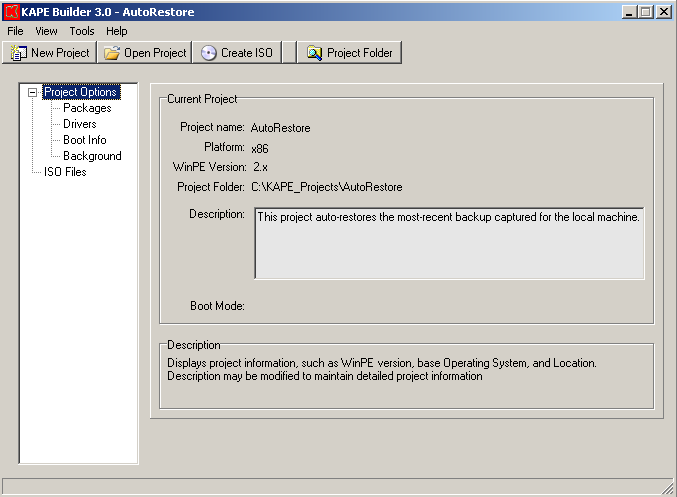
KAPE manages each separate WinPE environment as a project. When a new KAPE project is started, a new folder will be created (named after the project name), and all necessary files and folders will be established in this folder, including the iso folder containing the standard WinPE files.

Please note, KAPE will utilize a single Wim file for the entire project, and is located at project_folder\working\ISO\sources\boot.wim.

Installation

No installation is required. Simply unzip the contents of the zip file into a new folder, and double-click kape.exe to start building your first project.

Initialization

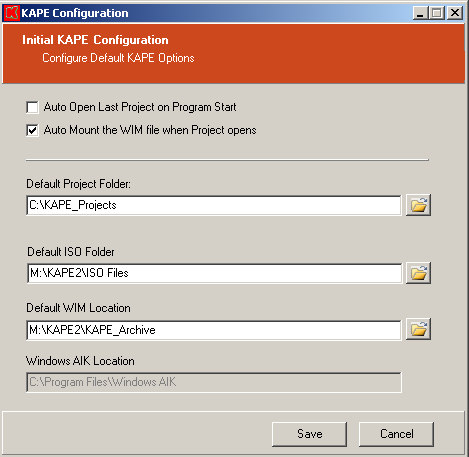
The first time KAPE is run, a preferences window will be displayed requesting the configuration of the following settings:

  • Auto open last project at program start
  • Auto mount the WIM file when the project opens
  • Default KAPE project folder- Default location to create new projects. This location is also used to list existing projects when opening or deleting projects.
  • Default ISO folder- Default folder in which to create new ISO files.
  • Default WIM location- Determines a folder containing any desired customer WIM files.
  • Windows AIK location- The folder where the WAIk is installed. This location will be auto-detected.

New Project

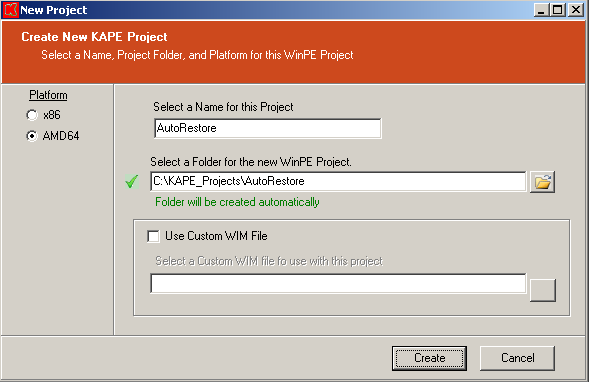
Upon selecting a new project, the following options are presented:

  • Project name- A unique name by which to identify this project.
  • Project folder- The complete path to the folder specified for the project. A default folder will be specified based on the default project folder and project name, but this location can be changed. The specified folder will be created.
  • Platform- Specifies whether to create a 32 or 64 bit project
  • Custom WIM- By default, a standard WinPE Wim file will be utilized for the new project. By checking this box and selecting an existing wim file, KAPE will use the custom wim file instead.
Once the Create button is clicked, the project folder will be created, the project files will be copied or created in this folder, and the Wim file will be automatically mounted.

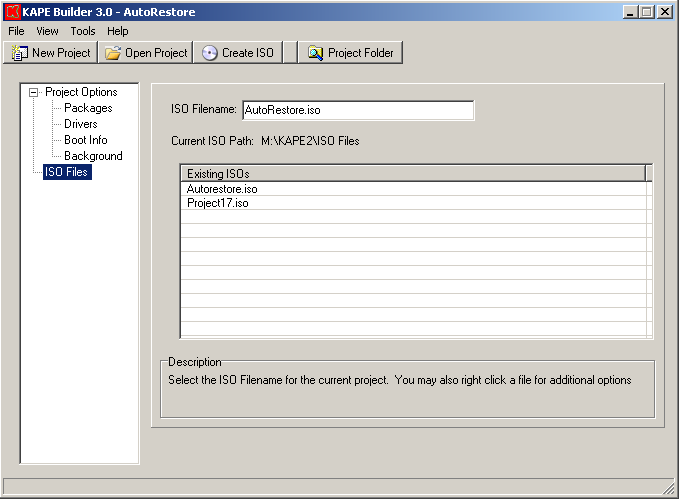
Project Options

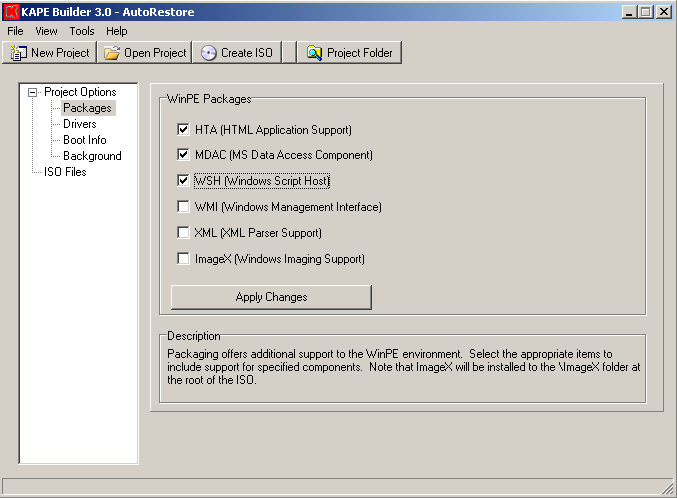
  • Packages- Allows for the installation of one or more of the following packages: HTA, MDAC, WSH, WMI, XML, ImageX
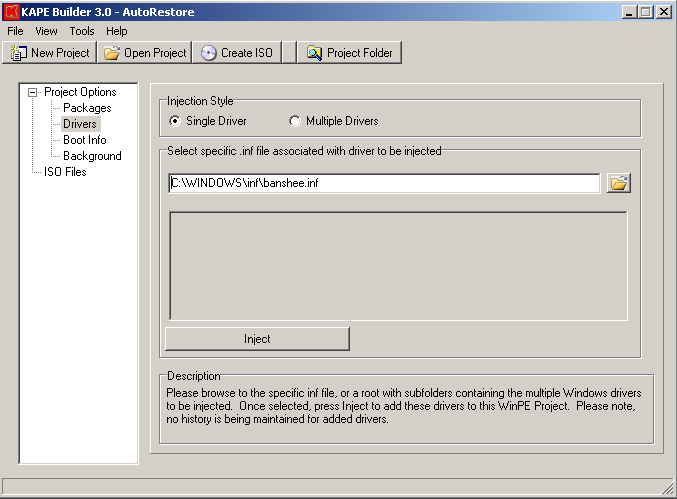
  • Drivers- Provides for the installation of a single, or multiple Windows drivers into the WinPE environment. A history of installed drivers is maintained in Default Project Folder\misc\driverlist.txt.
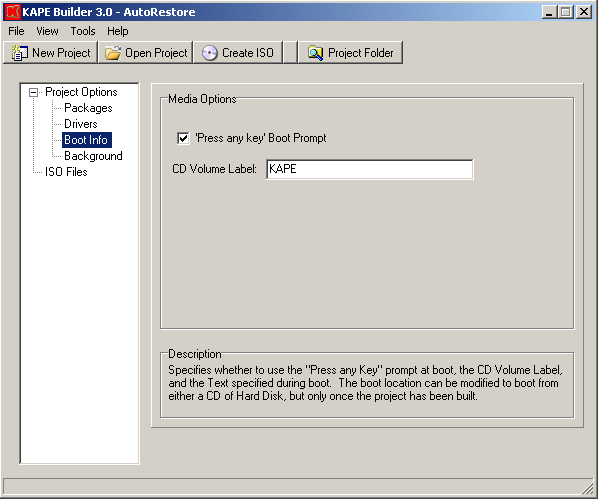
  • Boot Info- Press any key boot prompt, CD volume label
  • Config Files- Enables direct editing of basic configuration files, such as startnet.cmd and winpeshl.ini.
  • Execute- Provides user configurable task execution in the following instances: after the Wim file is dismounted, directly before the ISO is created, and after the ISO is created.
  • Background- Allows for the selection of a custom background in the WinPE environment

Menu/Toolbar Items

  • Open Project- Lists the existing projects under the Default Project Folder, and allows the user to select and open an existing project.
  • Create ISO- Creates an ISO file from the currently loaded project. Any mounted WIM file will be automatically unmounted before creating the ISO. The ISO file will be saved in the Default ISO location, and will be named after the project.
  • Project Folder- Opens Windows Explorer and lists the folder associated with the project.

Folder Structure

The following folder structure is created for each KAPE project:
-Working
  - ISO - The standard WinPE ISO folder containing boot, sources, etc.
  - Mount - The files/folders in the Wim file will be avaialble when mounted
-Log - All log files will be stored in this folder
-Misc - Stores persistent files required for project management.
-Temp - Used for temp files, specifically for temporary mount files

Requirements

  • KAPE supports operating under all Windows operating systems starting with Windows XP.
  • All versions of the Windows AIK are supported, including Windows Vista/2008 and Window 7 versions.

Troubleshooting

For difficulties or problems with KAPE, please visit the KAPE support page for common problems, or you may contact us, including as much information as possible, such as:

  • Operating system under which you are running KAPE, eg. Windows XP SP2
  • Specific version of the Windows AIK
  • Process being attempted when the problem occurred
  • Any error messages displayed by KAPE

Loading, please wait...

MD5: d41d8cd98f00b204e9800998ecf8427e
SHA1: da39a3ee5e6b4b0d3255bfef95601890afd80709
MD5:
SHA1:

Current News

  • August 12, 2010
    MBRWizard 3.0 updated to build 92. See changelog for details.
  • July 29, 2010
    MBRWizard Suite 3.0 released, including full GUI and WinPE builder
  • July 26, 2010
    Firesage.com updated with new web design
  • August 12. 2010
    KAPE WinPE Builder 3.0 updated to build 135
  • April 4, 2010
    BootSage flash builder released, Build 47.
  • March 10, 2010
    fsNetter network configuration application released as freeware